Update 17.6 was released (8/15/2024). WordPress Core was upgraded to 6.6.1 and all central third party plugins were updated to the latest version.
Author: Musa Jatkowski
Aurora Update 17.5
Update 17.5 was released (6/20/2024). WordPress Core was upgraded to 6.5.4 and all central third party plugins were updated to the latest version.
Each site’s media library storage limit has been increased to 10GB.
Aurora Update 17.4
Update 17.4 was released (3/21/2024). WordPress Core was upgraded to 6.4.3 and all central third party plugins were updated to the latest version.
A new calendar plugin has been released with an easy to use interface and advanced display options. For more information go to Events Calendar.
Smash Balloon Instagram Feed and YouTube Feed
Instagram Feed
Please ignore the email with Subject “There has been a problem with your Instagram Feed.”
“This is a courtesy email sent from the Smash Balloon Instagram Feed plugin on your website to alert you when there is an issue with one of your Instagram feeds.”
YouTube Feed
Ignore the link within the Dashboard for YouTube Feed as shown below. license key.
The message states in the blue banner, “
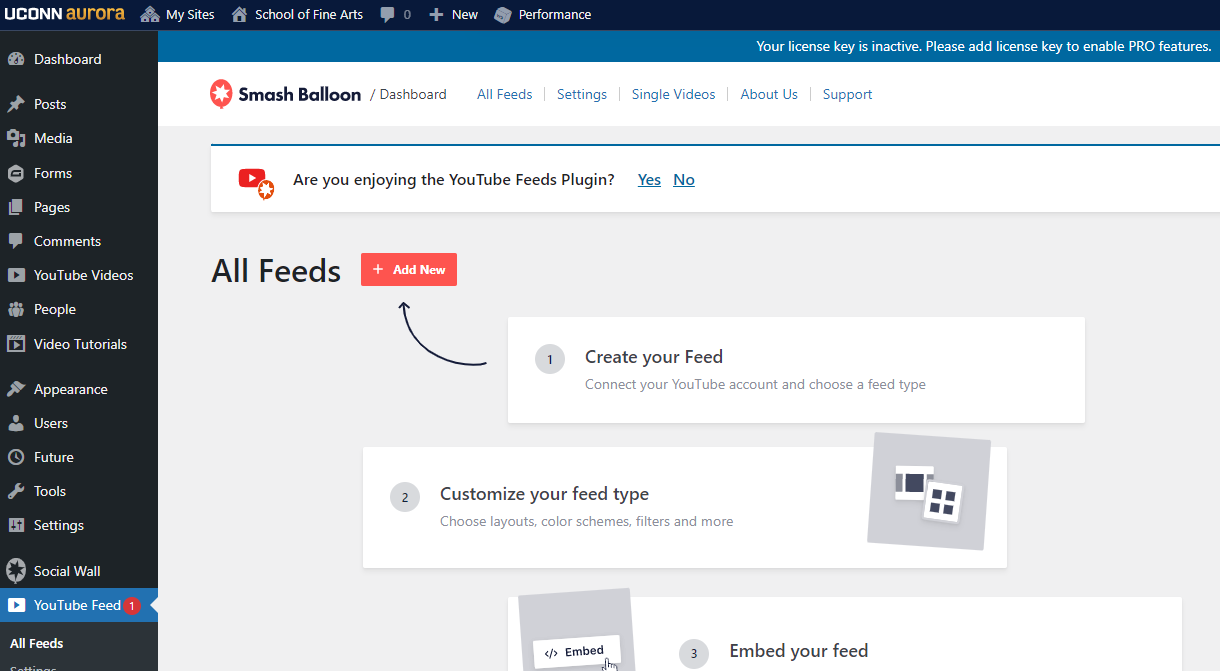
Please send an email to webdev@uconn.edu if you have any questions.
No Alt Text on Parallax Scrolling Image
Description
Background images set to Parallax Scrolling are being flagged with No Alt Text, even when images contain Alt Text.
Steps to Fix the Issue
The settings for Page Builder need to be updated for this to work.
- In the Dashboard, Go to Settings > Page Builder.
- Scroll down and click Save Settings.
- Clear Cache
If you still need assistance, please email us at webdev@uconn.edu and include a link to your site.
Permalink Page Not Found
Description
You’ve inserted a permalink to one page on your site that is supposed to lead to another page on your site. However, when you click the permalink it brings you to a ‘Page not found’ page.
Steps to Fix the Issue
If you come across this issue, please email us at webdev@uconn.edu and include a link to your site.
Page Not Updating
Description
You have made changes to a page and clicked ‘Publish’, but when you view the page the changes you’ve made are not there.
Steps to Fix the Issue
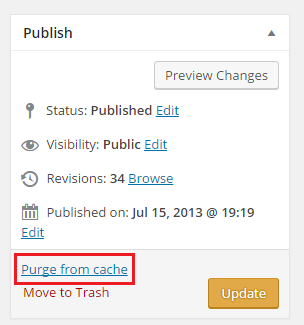
First, try clearing the cache on the page. To do this, go to the page’s editing screen. Then in the Publish section, click Purge from cache.
If this doesn’t fix the issue, please email us at webdev@uconn.edu and include a link to the page that is not updating.
Child Theming with CSS
Cornerstone was built with SASS, but you can still develop with normal CSS.
Don’t use @import in your CSS file, or your site will break in IE8.
Instead, add this to your functions.php file:
<?php
function link_parent_theme_style() {
wp_enqueue_style( 'parent-style', get_template_directory_uri() . '/style.css' );
wp_enqueue_style( 'child-style', get_stylesheet_uri() );
}
add_action('wp_enqueue_scripts', 'link_parent_theme_style');
?>
Typically, a child theme will @import the css of the parent theme. Bootstrap 3, the framework which Cornerstone is based on, offers very limited support for Internet Explorer 8. By default, a Bootstrap 3 site in IE8 will render the mobile view. One column of content, and the collapse mobile navigation.
Being that IE8 accounts for a sizable (~7%) of traffic on Aurora, Cornerstone makes use of respond.js, which uses javascript to mimic media queries for IE8. However, respond.js will not work on anything loaded via @import. So this alternate method is required.